The intuitive and clear display

Intuvia 100

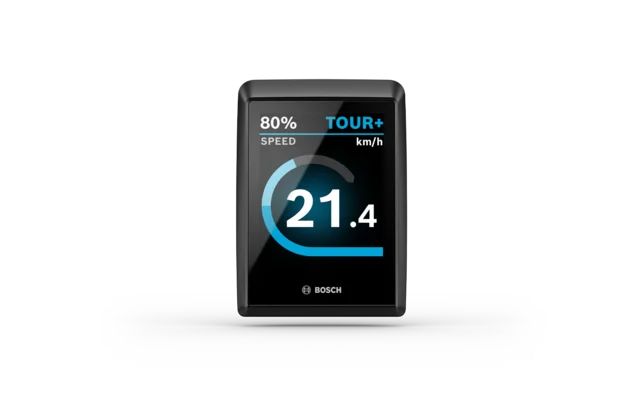
Cropped image of Intuvia 100 on a light gray background.
On the handlebar
Removable
2.5 inches
Diagonal screen size
Black and white display screen
Optimum readability
Clear layout
Simple and intuitive to use

A straightforward everyday companion

Intuvia 100 can be controlled intuitively using the control unit. This keeps your hands on the handlebar.

Open overlay

Optimal readability

The large font and clear design allow you to find all the information you need at a glance.

Open overlay

An eBike with the grip as the focal point. An Intuvia display and a LED Remote are mounted on it.

Easy mounting

You can position the Intuvia 100 mount on the handlebar wherever it suits you best, both visually and functionally.

Open overlay

Further benefits

Close-up of an eBike handlebar with an Intuvia 100 display showing information such as battery level (80%), speed (0 km/h), and distance traveled (25.4 km). On the left side of the handlebar, you can see an LED Remote.

Informed and supported

Intuvia 100 provides you with optimal support while on your ride. The display shows you ride data such as the distance, range, speed and riding mode selected.

Your activity data

After the ride, you can remove Intuvia 100 from the mount and use the button on the back to display the distance or duration. When connected to the eBike Flow app, you can also call up the data there.

Helpful shift recommendation

You almost don't have to think about anything: Your display shows you when you should shift up or down a gear.

A woman is in focus, sitting at a computer and smiling at the monitor. Out of focus is a customer who is talking to her.

Service note

A spanner icon indicates that the next service is due. Specialist dealers set the maintenance intervals – so you don't have to remind yourself and your eBike is kept up to date.

Reset trip

Intuvia 100 automatically resets your trip data – such as distance and trip time – every day. You can change the time period via the eBike Flow app or reset the trip manually at any time.

Walk assistance and hill start assist

Help on hills

Walk assistance

Hold down the minus button and start walking: Thanks to smart walk assistance, you can push your eBike more easily. If you stop, Hill Hold will be enabled, preventing your bike from rolling back unintentionally.

A woman wearing a helmet rides her white eBike along a cobbled street.

Hill start assist

Put your foot on the pedal and hold down the minus button: With hill start assist, you can ride off in relaxed manner – even when fully loaded.

1 / 2

Other functions

Protect your eBike

Our digital features, such as eBike Alarm with the ConnectModule, act as a deterrent and protect your eBike even better against theft.¹

Protecting your eBike

A woman wearing a bicycle helmet walks through the city, smiling and holding her smartphone. Her modern eBike is parked by a shop window, emphasizing an urban and active lifestyle.

Optimal support

Auto mode ensures you get the right level of support automatically. Such as if you lose speed due to climbs or a sudden headwind, for example. So you can relax and enjoy your ride.

Discover riding modes

A woman enjoys a ride on her eBike along a riverside path, with the Frankfurt skyline in the background.

For a more carefree ride

The Bosch eBike ABS provides more safety, stability and comfort during braking. With ABS Touring, you can enjoy the ride even on changing road surfaces or in unexpected situations.

Discover Bosch eBike ABS

Close-up of a Bosch eBike ABS on an eBike.

Updates for your display

Download the Intuvia 100 Update app from CicloSport® for free and follow the instructions to ensure your Intuvia 100 is kept up to date.

Download from the App Store Now on Google Play

A person holds a smartphone near their eBike and installs updates using the smartphone app.
1 / 4

Intuvia 100

How-to videos

How to use Intuvia 100

Find out more

A close-up of a hand gripping a bicycle handlebar. Mounted on the handlebar is a Mini Remote from Bosch eBike Systems. The blurred background reveals an outdoor setting.

Intuvia 100 with Mini Remote

Find out more

Technical data

Filter options
Technical data
Intuvia 100
SystemThe smart system
Screen sizeDiagonal approx. 2.5"/6.4 cm
Colour screenNo
Max. typical brightnessn/a
Handlebar diameter (with Display Mount kit)25.4 mm/31.8 mm/35.0 mm
Type of protectionIP55, protected against dust and water jets
Operating temperature- 5 °C to 40 °C
Power supply (with eBike system)CR2450 button cell battery
Charging station for external devicesNo
Dimensions (H x W x D)Approx. 74 x 64 x 18 mm
weightApprox. 62 g
Brightness control1*⁵
Notification tonesNo
Number of buttons1 and reset button
LanguagesEnglish, German, French, Spanish, Portuguese, Italian, Dutch, Danish, Swedish, Norwegian, Polish, Czech, Japanese, Traditional Chinese for Taiwan, Korean.

*¹ A smartphone is required and must be provided by the user
*² Only applies to SmartphoneGrip
*³ Suitable for smartphones incl. Camera bump and case with the following dimensions (L x W x H): 123 - 175 mm x 67 - 88 mm x 6.8 - 13 mm and a total weight of up to 276 g incl. cover. Not suitable for wallet cases.
*⁴ Without clamp
*⁵ Manually adjustable (backlight is not permanently on)
*⁶ Only applies to SmartphoneGrip Vertical.
*⁷ The USB-C® cable is not included in the scope of delivery.
*⁸ Suitable for smartphones incl. camera body and case with the following dimensions (L x W x D): 135–170 mm x 68–80 mm x 7–12 mm and a total weight of up to 260 g incl. case. Not suitable for foldable smartphones and smartphones with flip covers/cases. Depending on the case, the inductive charging feature may be limited.
*¹⁰ Without mount
*¹¹ Automatic brightness via light sensor or manually adjustable

Intuvia 100

Other models

The Intuvia 100 display is shown on a white background.

Intuvia 100

The intuitive and clear display.

  • The smart system
  • On the handlebar
  • Diagonal 2.5"
  • Black and white display screen
Current product
The Kiox 500 display is shown on a white background.

Kiox 500

Your touring companion.

  • The smart system
  • On the handlebar, removable
  • Diagonal 2.8"
  • Colour screen
About the product
Kiox 300 display isolated on white background.

Kiox 300

The smart companion for sporty adventures.

  • The smart system
  • On the handlebar, removable
  • Diagonal 2.0"
  • Colour screen
About the product

Close by

Find a local eBike dealer

Feel the Flow