Make your eBike smarter

eBike Flow app

depiction of a white eBike, a smartphone prominently placed in the center displaying Bosch's eBike Flow app, and a gray badge labeled Flow+.

The eBike Flow app provides your eBike with extra protection against theft and allows you to plan routes, view your ride data and download updates directly to your eBike. The app is free of charge. Flow+ gives you access to additional paid premium services if you wish.¹

Download from the App Store Now on Google Play

Experience more

What does the eBike Flow app offer you?

A person holds a smartphone with the Bosch eBike Flow app open. The display screen shows the activated Tracking mode and a triggered eBike alarm, which is a feature of eBike theft protection.

Theft protection

The eBike Flow app is your gateway to Bosch’s digital theft protection: you can lock the motor support function, making your eBike less attractive to thieves. If your eBike is stolen, you can mark it as stolen in the app. Flow+ adds GPS location tracking and an alarm to your eBike.²
Learn about theft protection

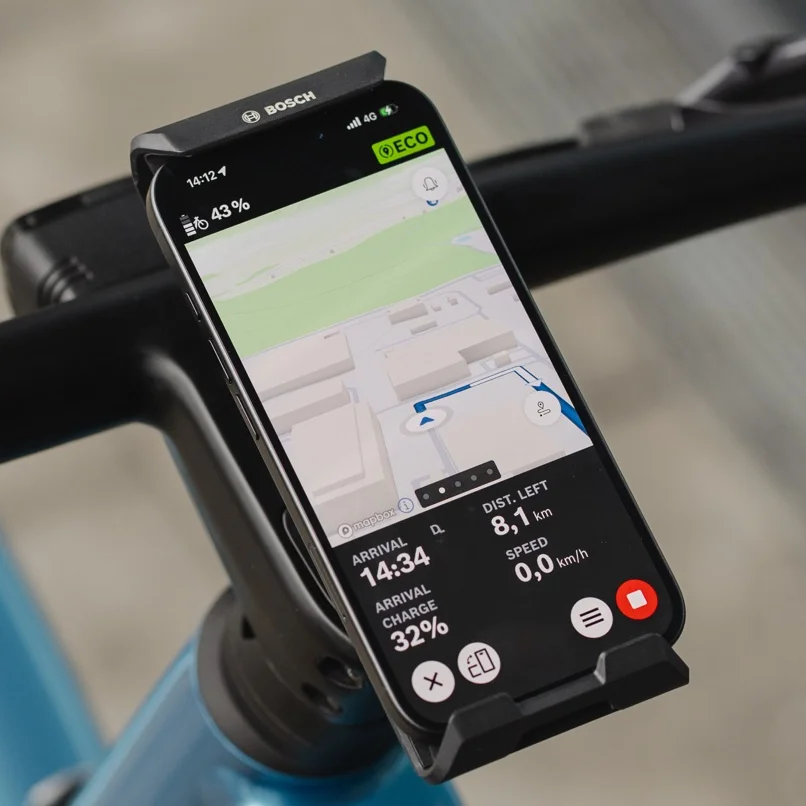
Close-up of a smartphone attached to the handlebars in the Bosch eBike SmartphoneGrip Vertical, used as an eBike display for navigation. The eBike Flow app shows a colorful road map with a blue route line, an upcoming left turn, and the remaining distance and arrival time at the bottom of the screen.

Navigation and ride data

Before setting off, you plan your route and, while you are on the road, the navigation guides you to your destination. You can then analyse your ride data, including distance, power and cadence in the statistics and share it.

Learn about navigation

Close-up of a smartphone displaying the eBike Flow app for customizing riding modes. The display screen shows the setting options for the eMTB+ mode, where you can adjust the maximum power to 600 watts using a slider.

Personalisation

The eBike Flow app allows you to choose which information appears on your display and to customise selected riding modes to suit your needs. This means that you can keep track of everything while you are riding and get the support you need.

Learn about personalisation

Even more app functions

Simply update

You can download updates directly to your eBike via the eBike Flow app using the smart system. This ensures that it keeps up to date – without needing to use any cables and needing to book an extra workshop appointment.

Learn about update and service

A young man sits at a wooden table, smiling as he looks at his smartphone. On the table, there is a glass of latte macchiato and a small plant. An eBike is visible in the background.

Let's get personal

You can customise your eBike’s riding modes in the eBike Flow app to suit your ride – for example, to provide a more powerful start or more efficient battery use.

Open overlay

Close-up of a hand holding a smartphone above the handlebars of an eMountain bike. The eBike Flow app is open on the display, allowing you to individually adjust the riding characteristics of your eBike—like the strength of the Extended Boost.

Plan your range

You can see in the eBike Flow app how much battery charge is likely to be left when you arrive at your destination. You also set the battery level you want to have when you reach your destination.³

Open overlay

Close-up of a smartphone displaying the Range Control feature in the eBike Flow app. A user adjusts the slider to set the desired battery level to 32 percent upon arrival at their destination, optimizing the range for their planned route.

Lock motor support

If your eBike is locked, motor support remains disabled. This makes your eBike less attractive for thieves to steal it. To unlock it, use your smartphone as a digital key.

Open overlay

A rider holds his phone in his hand and uses the eBike Flow app to unlock his eBike.

Mark your eBike as stolen

If your eBike is stolen, you can digitally mark it in the eBike Flow app. This will increase the chance of getting it back. This also applies to a stolen eBike battery.

Open overlay

Close-up of a smartphone displaying the 'Mark eBike as stolen' function in the Bosch eBike Flow app. The display screen explains how marking your eBike as stolen informs specialist dealer/retailer and other app users about the theft when they attempt to connect.

Configure your screen layout

You can choose in the eBike Flow app which information you want to appear on your display. This means that you can keep an eye on exactly what’s important to you during your ride.

Open overlay

A person is holding a smartphone displaying the Bosch eBike FlowApp with the screen layout "display configuration" and "Dynamic screen". The smartphone is held next to a bicycle handlebar equipped with a digital display that shows information such as battery level, mode (TOUR), speed, and range. The background is blurred and reveals an outdoor environment.

Manage multiple eBikes

You can add up to six eBikes to your account in the eBike Flow app, give them individual names and easily switch between them.

Open overlay

Close-up of a smartphone showing the eBike Flow app's digital garage. The display screen lists the user's personal eBikes, including an eMTB and a Gravel eBike, with the option to add more eBikes.

Use your smartphone as a display

The SmartphoneGrip and eBike Flow app allow you have key ride data and navigation features right on your handlebars – even in portrait view.

Open overlay

Close-up of a smartphone attached to the handlebars in the Bosch eBike SmartphoneGrip Vertical, used as an eBike display for navigation. The eBike Flow app shows a colorful road map with a blue route line, an upcoming left turn, and the remaining distance and arrival time at the bottom of the screen.
1 / 8

It's so easy to connect

Connected in three steps

Step 1

Download the eBike Flow app for free from the App Store or Google Play.

Step 2

Open the eBike Flow app and create your account.

Step 3

Switch on your eBike, turn on Bluetooth and follow the instructions in the app.

Free or with Flow+?

eBike Flow app (free of charge)

A whole host of digital features for your eBike included in the smart system.


  • Provide extra protection for your eBike

    Lock motor support, mark your eBike as stolen and generate a digital theft report.
  • Analyse and share ride data

    The app automatically records your tour and fitness data and synchronises it with Strava or Apple Health if you so wish.
  • Plan routes and navigate

    Select the appropriate route profile and map details, and follow the turn-by-turn directions while you are on the move.
  • Determine the range

    You decide on the battery level you want to have when you reach your destination. The support is then adjusted by your eBike accordingly during your ride.³
  • Customise riding modes and the display

    Determine how your eBike will support you and what information you want to see on your display.
  • Easily update your eBike

    Download new features via the eBike Flow app and then transfer them to your eBike via Bluetooth.
  • Keep track of data and services

    Find eBike data, service information and your eBike dealer’s contact details directly in the app.
Premium services

With Flow+ (paid service)

Adds additional premium services to the eBike Flow app.


  • All the features of the free eBike Flow app


  • Use the alarm on your eBike and track your location via GPS⁴

    If your eBike is moved unexpectedly, it will trigger an alarm emitting beeps and flashing lights, and you will receive a message on your smartphone. If your eBike is stolen, you can track its location live.
  • Provide additional digital protection for your eBike battery

    When you switch off your eBike, the battery is automatically locked digitally. If your battery is stolen, it can no longer be used.
  • Analyse ride data in greater detail

    Compare rider power and motor power and see which riding modes you used and how often.
  • View annual overview

    Get an overview of your key ride data for each year and track your progress over several years.
  • Check your battery level from anywhere⁴

    Even before you set off, you can see your battery’s current charge level and when it will be fully charged.
  • Share your eBike with family and friends

    You can invite up to five people to use your eBike along with you.
  • Navigate with more detailed maps⁵

    See more roads and paths on the map to enable you to find your way around more easily.
  • Discover routes in 3D

    View terrain and prominent buildings in 3D on the map in the eBike Flow app – even without active navigation.
  • Enjoy premium services on up to six eBikes

    Use Flow+ for up to six eBikes in your account. The premium services available to you on a particular eBike depend on the equipment it has.

Try out for free what Flow+ has to offer for your eBike⁶

More about Flow+

Learn about the app before you buy it

A collage of three smartphone screens displaying different features of the Bosch eBike Flow app: the center shows the home screen with battery level and riding modes, the left shows the navigation view with route guidance, and the right features the eBike Tracking mode for locating an eBike.

Learn about the app before you buy it

Download the eBike Flow app, even if you don’t have an eBike yet. This will allow you to plan routes, get to know the basic features and then visit the eBike dealer with a better understanding.

Download from the App Store Now on Google Play

1
5
millions
eBike Flow app downloads up to the end of June 2026
3.8
4.6
out of 5 stars
based on an average of 130,000 reviews (iOS/Android)
5
5.9
billions
Kilometres ridden with the eBike Flow app

FAQs

The eBike Flow app works with eBikes fitted with the Bosch smart system. If you’re not sure which Bosch eBike system your eBike has, you will find a quick way to check in the Help Center.

The eBike Flow app is available for numerous smartphones running iOS or Android. You can find out which operating system and Bluetooth version your smartphone requires in the Help Center.

Yes. You can download and use the eBike Flow app for free. Flow+ adds optional paid premium services to the app.

The eBike Flow app provides your eBike with additional digital protection against theft, plans routes for you and navigates to your destination, analyses ride data and downloads updates to your eBike. You can also configure your display and specify what information you want to see on it. You can also customise the riding modes to your requirements.

Download the eBike Flow app, open it and create an account. Next, switch on your eBike, activate the Bluetooth app on your smartphone and follow the steps in the app.

The smartphone and eBike are connected via Bluetooth. You can therefore use some of the eBike Flow app’s features even without an internet connection – for example, locking and unlocking motor support. You need an internet connection for certain settings, as well as for calculating or recalculating routes. Your ride data will be temporarily stored and synchronised later. You can find further information in the Help Center.

No. You can also use the eBike Flow app without a ConnectModule. You only need a ConnectModule for certain Flow+ premium services – for example, to use the alarm on your eBike, track your location via GPS or check the current battery level remotely.

The eBike Flow app is designed for eBikes fitted with the Bosch smart system. The eBike Connect app is designed for eBikes fitted with the Bosch eBike System 2.

To the Help Center

Well-informed

Find what suits you